Unitree H2-X car-lifting demo: create a robot action short with AI
The Unitree H2-X car-lifting scene is a staged rescue with a human-shaped prop. See what the 61-second launch film shows, then plan an original robot action short with a keyframe and two AI video prompts.
Unitree H2-X is a humanoid robot that Unitree publicly demonstrated on October 21, 2026. Its “Kung Fu Legend Guardian” launch film runs for about 61 seconds. The scene often described as “lifting a car to rescue someone” is a staged rescue using a human-shaped prop, not footage of a real accident.
The official launch film runs for about 61 seconds and includes a staged rescue using a prop.
First, let’s look at what the film shows, then use an original equipment-case scene to explore how to design a robot action short with AI.
What happens in the 61-second launch film
The film shows a black-and-white robot performing airborne kicks and kung fu movements in a scrapyard. Sparks and stacks of scrapped cars give the footage the feel of an action movie.
The car-lifting sequence follows a clear chain of actions: a human-shaped prop lies near a front wheel, the robot bends its knees and supports the front of the car, and a crew member pulls the prop out. The footage explicitly identifies it as a prop. Only the front of the car is raised; this scene should not be described as the robot lifting an entire car over its head.
The ending also shows the robot sitting in bed, adding an everyday contrast to the kung fu and rescue scenes.
A staged rescue does not establish autonomous rescue capability
These shots are not enough to determine how the robot recognizes the situation, who controls it, or whether it would be equally reliable in a real emergency. They do not establish that it can carry out rescues autonomously.
For filmmakers, the useful idea is the causal sequence: make contact, apply force, create space, then move an object out. Next, we’ll use an original robot and an equipment case to turn that sequence into shot requirements you can adjust one segment at a time.
Start with a keyframe that makes contact and clearance easy to see
Our original scene changes the objective to retrieving an equipment case. In a bright industrial parking area, a teal robot supports the front of a silver-gray compact car while a crew member in an orange jacket pulls an orange case out from the side.
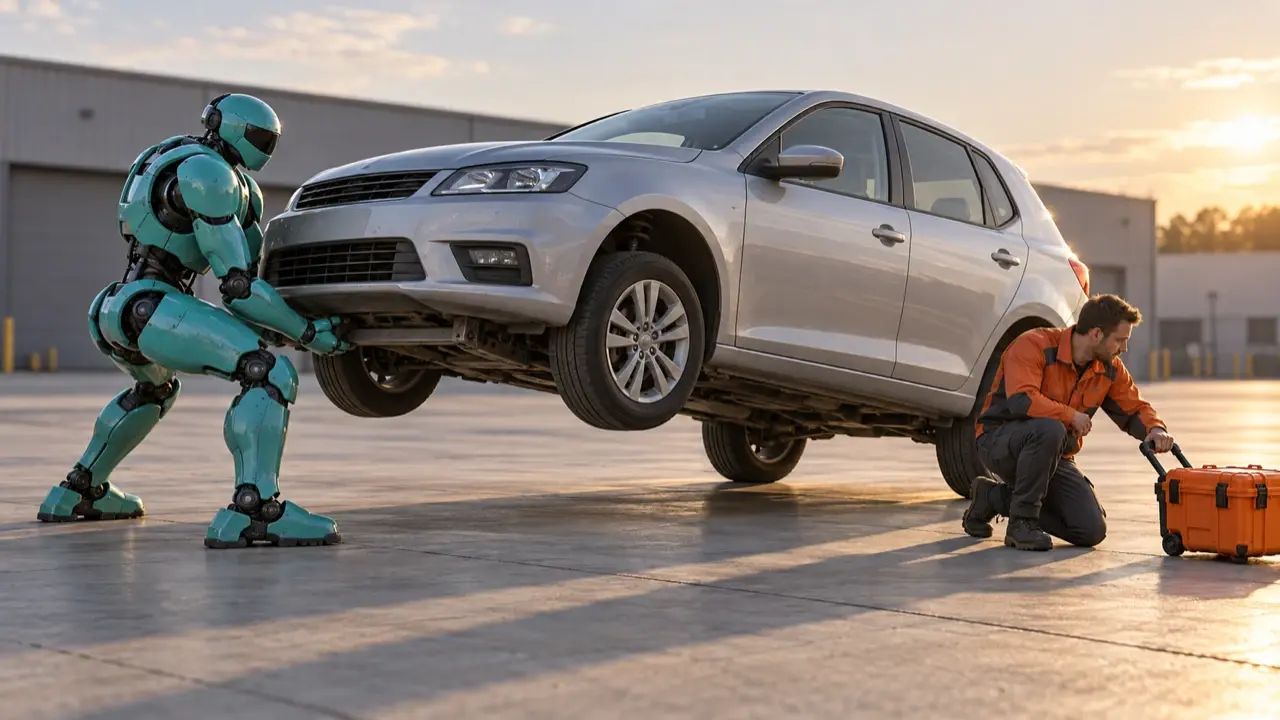
The keyframe should clearly show the hand contact points, the robot’s feet, the wheels, and the case’s exit path. Keep the robot out of that path, and avoid showing only a close-up of a car already suspended in the air. You can describe the image like this:
A realistic sci-fi film keyframe in 16:9. In a bright industrial parking area, a teal humanoid robot stands at the front of a silver-gray compact car, feet planted apart and knees bent, with both hands against a fixed load-bearing point beneath the front of the car. Only the front axle is raised, with the front wheels about 25 cm above the ground. Both rear wheels stay on the ground, and the body tilts slightly around the rear axle. On the right, an adult crew member in an orange jacket pulls an orange equipment case along the side passage toward the right foreground. Only one corner of the case is caught beneath the lower front edge of the car; most of the case is outside it. Make the path clear, with no intersections between the case, tires, or robot. Use a wide front three-quarter view that includes the entire robot, car, and crew member. Keep the four-wheel geometry correct, contact shadows natural, and the car body rigid. No branding, text, injured people, or sparks.
This image establishes a pose in the middle of the action. To prepare the first segment, edit a starting frame from this same reference: all four car wheels on the ground, the robot’s hands not yet touching the car, and the crew member waiting on the right. Keep most of the case in the side passage, with only one corner caught beneath the lower front edge; do not force a large case entirely under the car. Preserve the characters, setting, lighting, and camera position. Start the contact-and-lift sequence from that frame, then use the first segment’s final frame to begin the second.
Split the lift and retrieval into two segments
Packing flips, lifting, rescue, and lowering into one clip can cause steps to be skipped. Start with two shots of about six seconds each and complete this one action.
Segment one: make contact before lifting.
0–6 seconds. A fixed wide front three-quarter view in a bright industrial parking area. A teal robot faces the front of a silver-gray compact car. A crew member in an orange jacket waits on the right. Most of the orange equipment case is in the side passage, with only one corner caught beneath the car’s lower front edge. At 0–2 seconds, the robot plants both feet, bends its knees, and places both hands against the fixed load-bearing point. At 2–6 seconds, it extends its legs and slowly lifts the front of the car until the front wheels are about 25 cm off the ground. Both rear wheels remain on the ground throughout. The hands do not slide, the feet do not drift, and the car body and tires do not deform. End holding the raised position without moving the case.
Segment two: hold steady, retrieve the case, then lower the car.
6–12 seconds. Continue from the previous segment’s final frame, keeping the characters, car body, hand contact points, rear-wheel support points, lighting, and camera position consistent. At 6–8 seconds, the robot holds the front of the car up while the crew member pulls the orange equipment case from the right side along a clear path toward the right foreground. At 8–10 seconds, the case clears the car completely and the crew member steps back. At 10–12 seconds, the robot slowly bends its knees to lower the car; the front wheels touch the ground before its hands release. No case passing through tires, sudden car levitation, teleporting crew member, or mid-shot changes to the car model.
Check three things first: do the hands stay against the load-bearing point, do the rear wheels remain in place, and does the whole case follow the same clear path? If one fails, revise that action rather than replacing the entire visual style.
Bring your character references, keyframe, and segmented brief to PagePop. Start with a short shot, then refine contact, speed, and the case’s path. Those instructions are easier to act on than a vague request to “make it more cinematic.”