Hay bale photo ideas: composition tips and AI portrait prompts
Compose autumn portraits with round hay bales, natural depth, and playful perspective. Try PagePop editing prompts that preserve hay texture, scale, and grounded shadows.
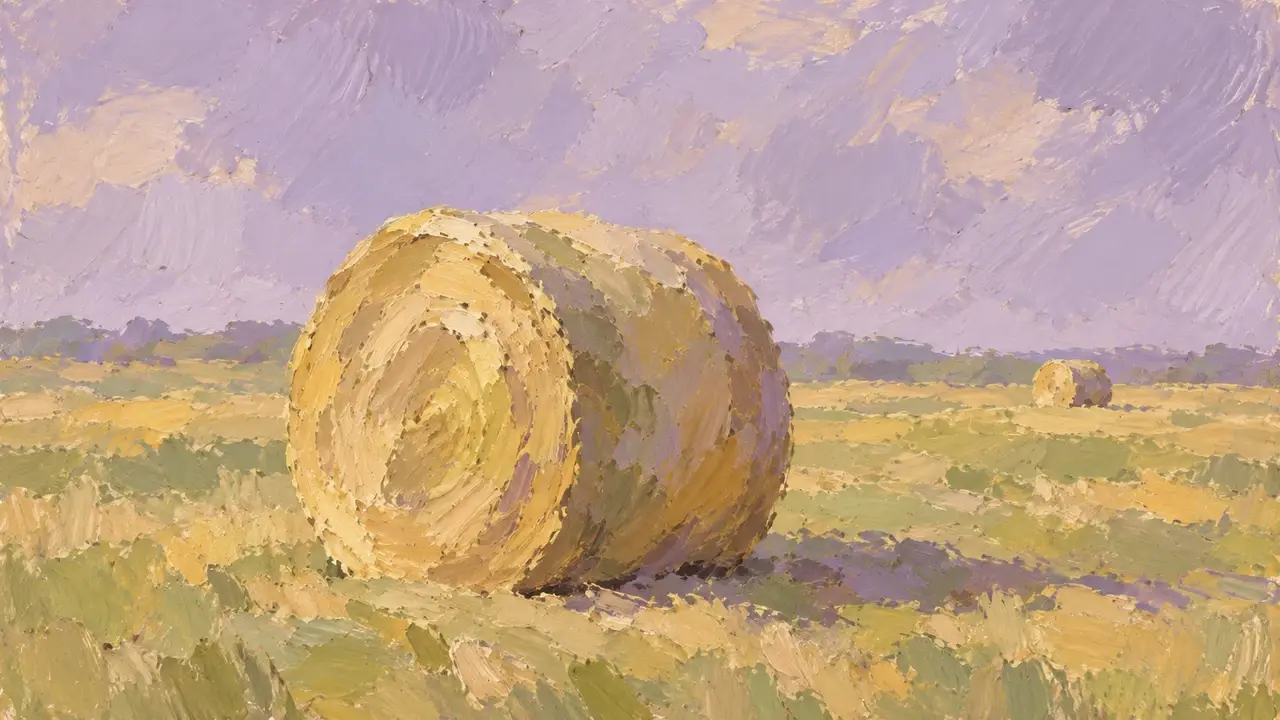
Round hay bales scattered across a field can look like giant Swiss rolls. Their circular ends, curved sides, and smaller shapes in the distance create layers in an autumn photo. Add a person, and you also have a clear sense of scale.
For an open, relaxed composition, choose one nearby bale as the focal point, position the person slightly to one side, and leave room for sky or grass. When editing with AI, preserve three relationships: the object is rolled hay, not a cake; the person and bale are a believable distance apart; and everything rests on the same ground.
Show the circular end and a little of the side
Photographing a bale straight on makes its rolled outline easy to see, but it can also look like a flat disc. Shift the camera angle slightly to reveal part of the side next to the circular end, making the cylindrical shape easier to read.
You don't need every blade of hay to be sharp. Visible fibers in the nearby bale and small, simplified patches of color in the distance can create a stronger sense of depth. If there are many similar bales behind the subject, choose one as the focus rather than making them all equally large and clear.
The person can stand diagonally in front of the bale or slightly behind and to one side. Avoid placing the bale's circular edge so it appears to cut through their head. Adjust your camera position where photography is permitted; you don't need to move, climb on, or pull apart a bale to get the composition.
Choose one of three compositions for your main image
| Feeling to capture | How to frame it | Easily missed detail |
|---|---|---|
| You in an autumn setting | Place the person beside a bale with space around both outlines | Keep the face recognizable and avoid the bale overlapping an arm |
| The openness of the grassland | Include more landscape, with the person as a small patch of color and progressively smaller bales in the distance | Don't let the horizon cut through the neck; near and far sizes should make sense |
| Playful forced perspective | From the camera's position, make a palm appear to support a small distant bale | Align the hand with the bale's edge; they don't need to actually touch |
Forced perspective depends on the camera position. Keep the camera still while the person makes small adjustments to their hand. If both move a lot at once, alignment becomes difficult. Take a short sequence and choose a frame with a natural gesture rather than twisting the wrist awkwardly to match the outline.
If you have a field photo, change only what distracts
Bring your chosen original to the PagePop AI Image Editor. Explain which parts of the person, bale, and horizon must stay, then describe the local adjustments. You can click a spot in the image preview so “improve the background” doesn't become a request to rebuild the whole field.
Here's an example request for editing an existing photo:
Please edit this portrait beside a hay bale.
Preserve the person's facial features, hairstyle, clothing, pose, and size relative to the nearby bale.
Make the nearby hay bale's circular end and side easier to distinguish. Keep natural hay fibers; do not turn it into a cake or a smooth cylinder.
Keep the grass a mix of yellow and green, reducing excessive orange-yellow tones without tinting the person's skin yellow.
Preserve the original horizon, positions of distant bales, and light direction. Do not add decorations or text.
If only one corner is too distracting, narrow the edit further. After editing the grass, check the contact shadows beneath the person's shoes and the bale. Floating objects or shadows pointing in different directions undermine the sense of space that makes this kind of photo work.
Turn an ordinary portrait into a creative hay bale scene
Without an original field photo, you can upload a clear portrait of yourself and request a new setting. A full-body photo with a complete outline, visible feet, and a simple pose makes it easier to specify where the person should stand. A half-body portrait can also work for a closer composition; you don't have to ask for a full body that isn't visible in the original.
You're creating a portrait in an imagined setting, so share it as an AI creative image rather than a record of an actual visit. For example:
Use my uploaded full-body portrait as the reference for the person and create an autumn hay bale image.
Preserve the person's identifying features, clothing, and standing pose.
Place the person on yellow-green grass beside a cylindrical bale of rolled hay, showing its circular end and part of its side.
The bale should have a rough, dry hay texture, with no cream, cake layers, icing, or packaging.
Place only a few smaller bales in the distance. Nearby objects should be larger than distant ones, and the horizon should sit below the person's shoulders.
Use soft light, with the person and bale casting shadows in the same direction. The feet and base of the bale should meet the ground naturally.
Leave some sky in the frame. Do not generate text, logos, or additional people.
If the result looks more like a dessert photo, explicitly ask for “an agricultural hay bale” instead of simply adding “more realistic.” If the person looks pasted in, first compare the light direction in the portrait and the new background. Then ask for contact-shadow and surrounding-color adjustments rather than redrawing the whole person.
Before saving, check the circles, ground, and person
View the image small first to see whether your eye lands on the intended subject. Then zoom in on bale edges, fingers, shoe soles, and the face. Watch for distant bales that are unexpectedly larger than nearby ones, circular ends distorted into implausible ovals, and obviously repeating grass textures.
For a series, keep one main portrait, one environmental view, and one forced-perspective photo. Each serves a different purpose; the bale doesn't need to fill every frame. Get the cylindrical shape and spatial relationships right in one image before coordinating colors across the whole set.