Seedance 2.5 prompts: 8 creative video ideas with storyboards
Add an animated vlog companion, fold book pages into a city, or travel inside a croissant. Explore 8 Seedance 2.5 ideas with reference tips, prompts, and storyboards.
Add an animated companion to an everyday vlog, make fruit burst out of a drink can, or shrink the camera and take it inside a croissant. A Seedance 2.5 prompt can start with one specific visual transformation.
Seedance 2.5 supports image, video, and audio references, as well as editing existing videos. Here are 8 creative video ideas, each with materials to prepare and a prompt you can adapt. The illustrations use three storyboard frames to show the starting point, transformation, and ending, so you can decide on the scene before making it.
These templates are designed for roughly 10 seconds. Match “Image 1” and “Video 1” to the files you actually upload. Shot duration, aspect ratio, and available reference options depend on the interface you use.
1. An animated companion: let a little character live in your vlog
Give a flower shop, café, or craft vlog a little story. The character doesn't need to fill the frame. Have it respond to one real-world action: opening an umbrella when plants are watered, yawning when the lights go out, or waving at closing time.
Prepare: A fixed-camera flower shop video trimmed to 10 seconds, with watering between seconds 3 and 7, plus an original character image with a simple silhouette.
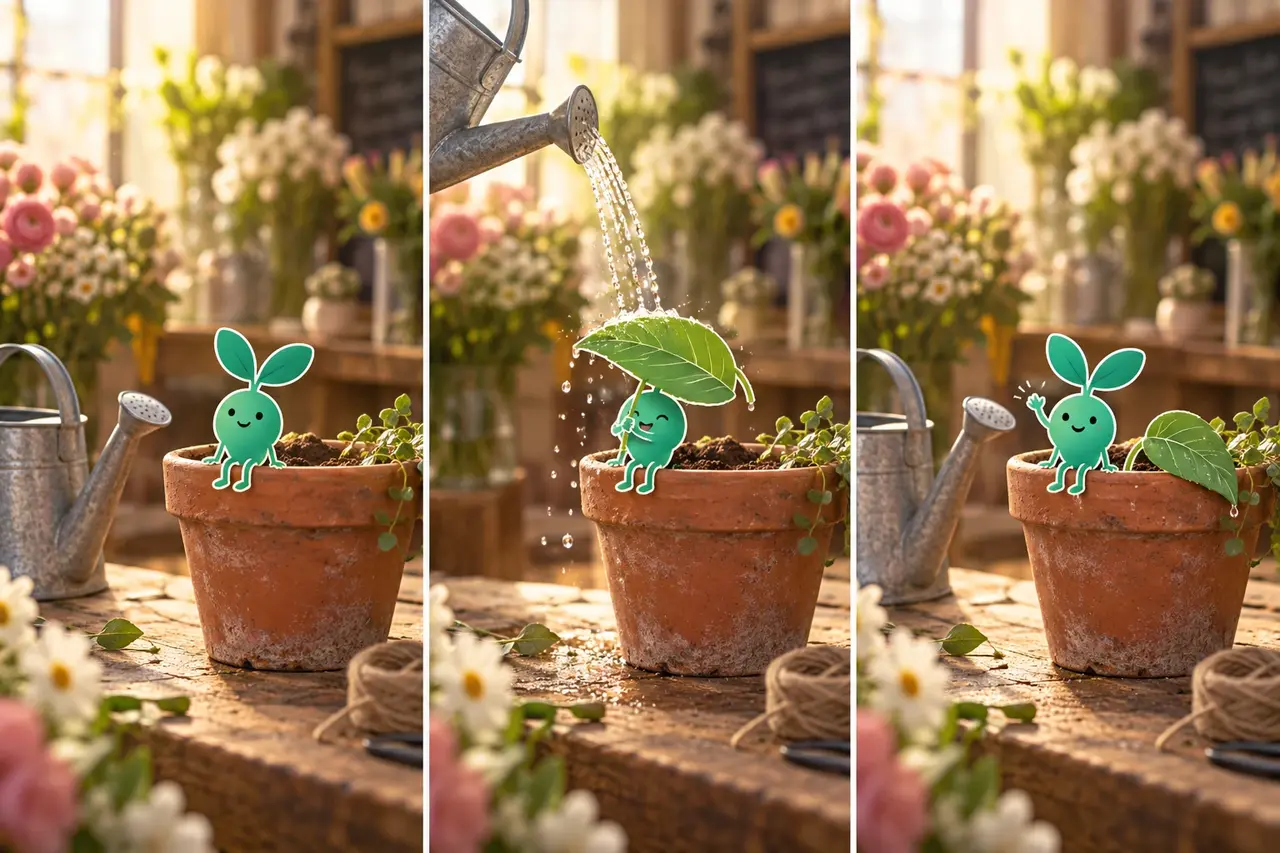
Use Video 1 as the live-action background. Use Image 1 only for the appearance of the teal sprout character. Preserve the original video's setting, camera position, and duration. From 0–3 seconds, the sprout sits on the edge of a flowerpot, swinging its feet. From 3–7 seconds, a watering can at the side of the frame starts pouring, and the sprout raises a leaf as an umbrella. From 7–10 seconds, the water stops; it lowers the umbrella and waves at the camera. Keep the sprout a 2D hand-drawn character with a white outline, consistent size, and consistent color. Its feet stay on the pot's rim, and foreground leaves naturally obscure it when they pass in front. Keep the sound of running water and add light movement sounds. No subtitles.
Specify where the character stands, what it responds to, and what can pass in front of it. That gives you a more complete shot than simply asking to “add a cute cartoon character.”
2. A burst of fruit: turn a product image into a can-opening ad
This works for drinks, fragrances, and snack videos. Let viewers see the product first, add one burst of action, then return to a clean hero shot. Use fruit and liquid to express the flavor without hiding the packaging throughout the clip.
Prepare: A front-facing product image. Add references for fruit shapes, ingredients, or colors if you need to keep them specific.
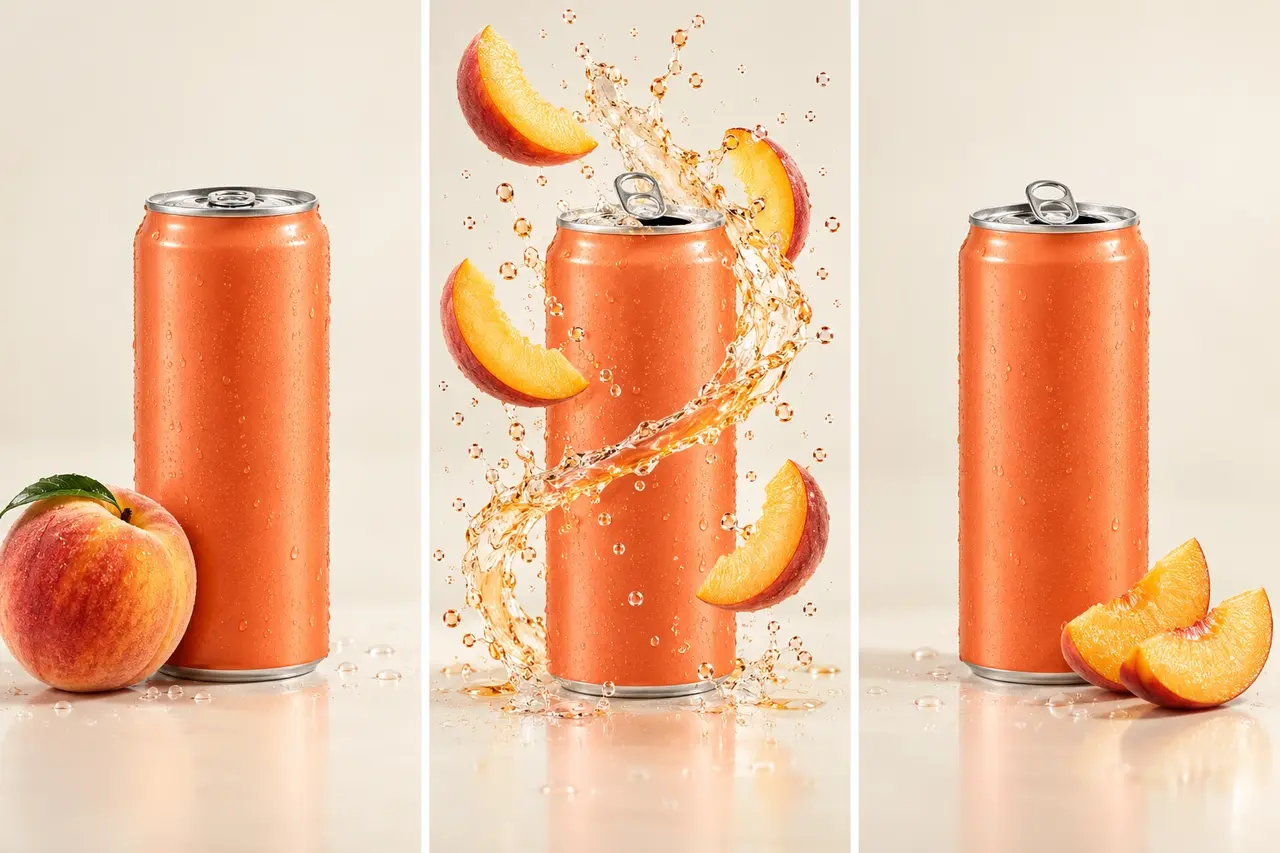
Use the shape, proportions, and color of the drink can in Image 1 to create a 10-second peach drink ad. Cream-white background, fixed close-up. From 0–3 seconds, tiny condensation droplets cover the can as the pull tab slowly lifts. From 3–7 seconds, the can opens with a soft pop; peach slices and a translucent ribbon of juice spread outward from the opening in brief slow motion, keeping the front of the product visible. From 7–10 seconds, peach slices settle beside the can, the juice leaves the frame, and the shot ends on a clean product still. Keep the can in place while allowing the tab to open. The fruit and liquid move, but the can does not deform. Add no new text. Use the sounds of the can opening, bubbles, and falling liquid.
For another product, replace “peach slices + juice” with something tied to its selling point, such as citrus peel, coffee beans, or petals. Keep the same opening–burst–ending structure.
3. Book pages become a city: build a fantasy transition with a clear connection
Use this for a travel intro, a bookstore promotion, or the beginning of a story. The appeal is watching paper fold into buildings step by step, then moving closer to the streets. Avoid suddenly cutting from a book to an unrelated city photo.
Prepare: An image of an open book for the starting frame. Add a scene reference if you want a specific destination style.
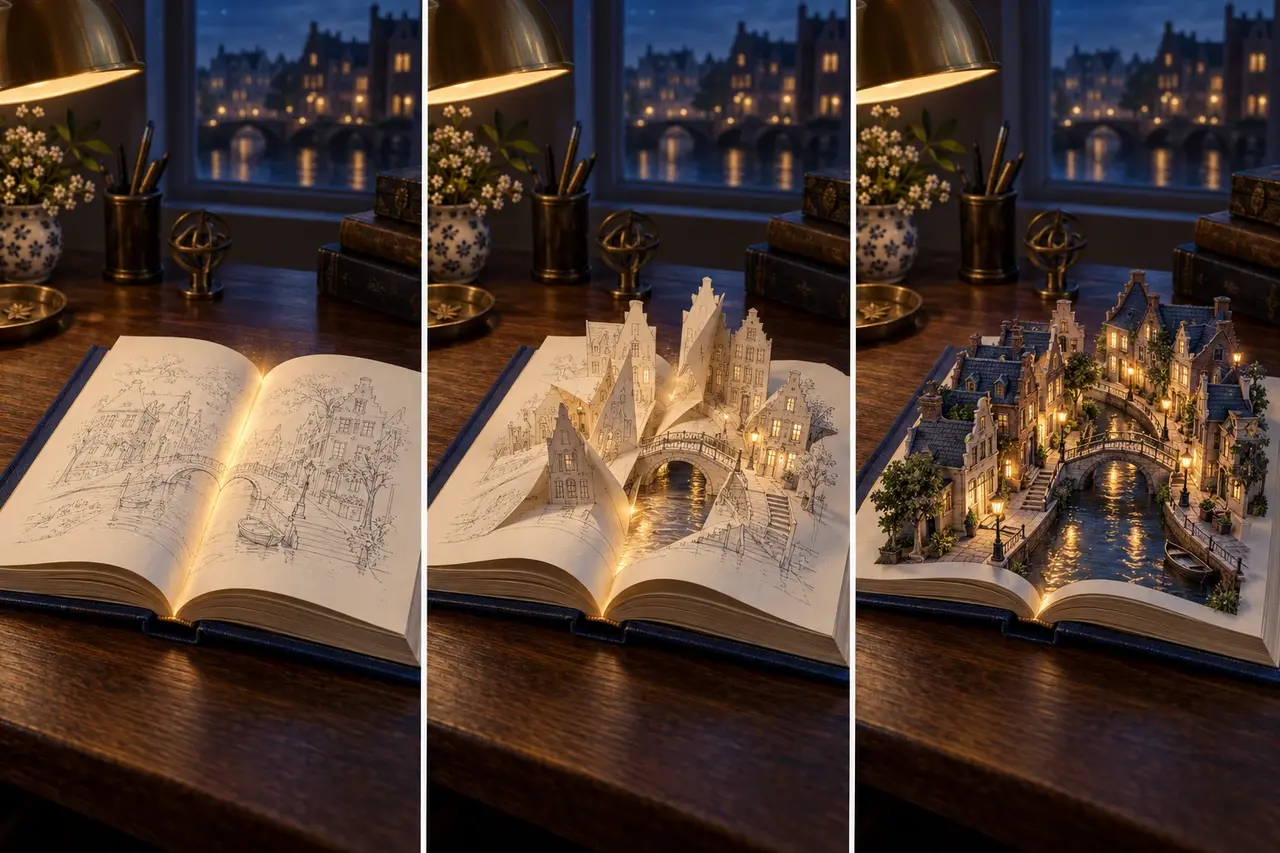
Start with the open book in Image 1 and create a continuous 10-second shot. From 0–3 seconds, the camera slowly pushes in from above the table as one page gently lifts. From 3–7 seconds, the pages rise along their folds to form two rows of waterside houses; the spine extends into a canal, and a paper arch bridge connects the banks. From 7–10 seconds, the window lights turn on one by one, the paper gradually gains detailed architectural textures, and the camera continues toward the bridge, stopping while the book's edges are still visible. Keep the book's outer silhouette visible in the first half. All buildings must fold continuously from the existing pages, with no hard cuts or suddenly added towers. Warm window light against deep-blue night colors, with page-turning sounds and gentle water sounds.
You can use the same approach for a map folding into a valley or record grooves becoming a circular racetrack. Find matching shapes in the two scenes before designing the transformation.
4. Inside a croissant: explore a miniature food world
Try this for baking, dessert, and restaurant content. Turn pastry layers, chocolate, and jam into a space the camera can travel through. A clear entrance keeps the result from becoming a rapidly spinning mass of texture.
Prepare: A dessert photo with a clearly visible opening, with the crack or filling facing the camera.
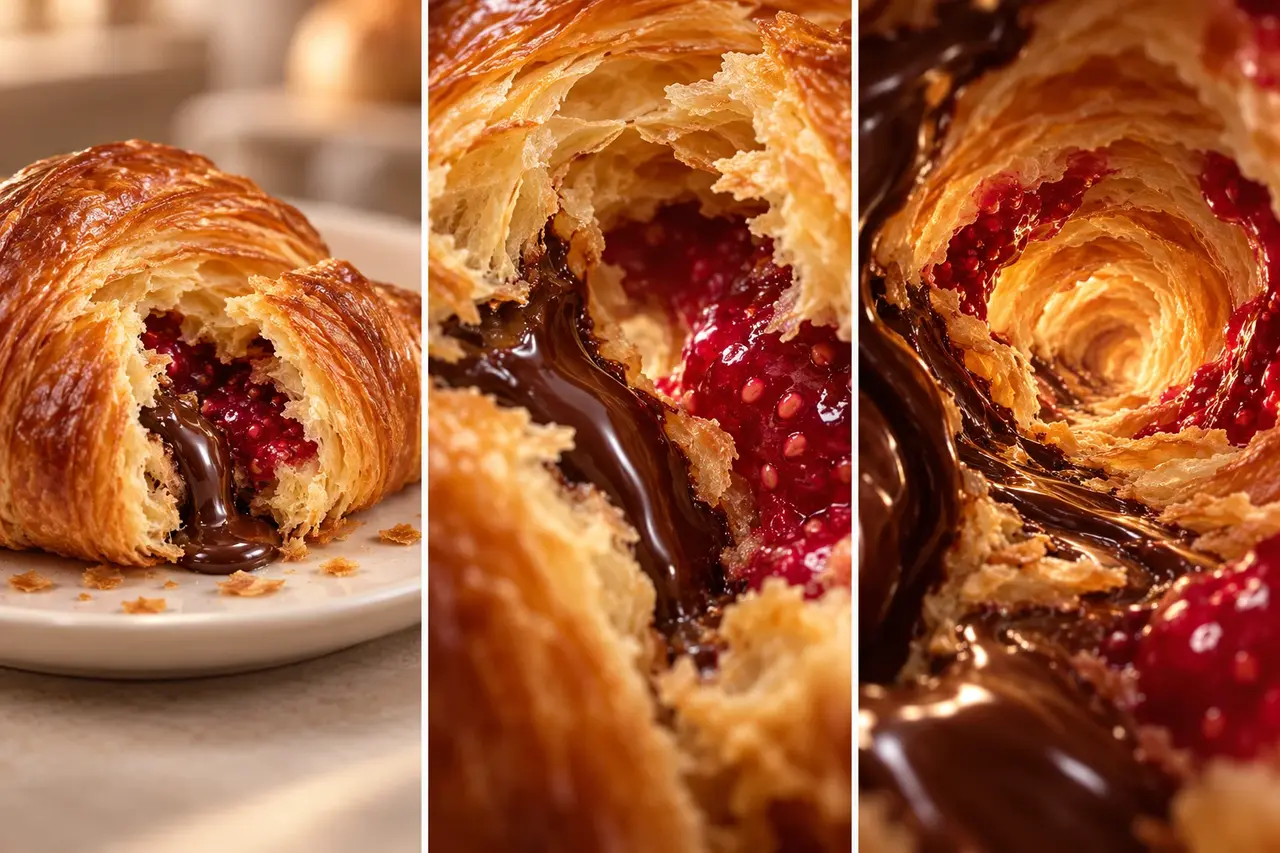
Use the raspberry chocolate croissant in Image 1 as the reference for a 10-second miniature adventure shot. From 0–3 seconds, slowly approach the front opening of the whole croissant on a white plate. From 3–7 seconds, move smoothly along the crack, passing the chocolate filling and layers of golden pastry as the viewpoint gradually shrinks. From 7–10 seconds, enter an arched tunnel formed by the pastry layers, then slow down and stop beside translucent raspberry jam. Use one continuous take. Keep the food textures recognizable throughout; do not turn them into rock or lava. Shallow depth of field, warm side lighting, and sound that gradually shifts from the surrounding ambience to faint pastry crackles.
First specify “where to approach, what to pass through, and where to stop,” then add camera speed. Don't ask for large rotations, fast dives, and several scene changes at the same time.
5. A sketch grows into a cabin: bring a design off the page
This can open an architectural concept video, a guesthouse introduction, or a design portfolio. It shows a design idea moving from a flat drawing into physical form; it isn't precise modeling from construction drawings.
Prepare: A perspective sketch of a small cabin, with a clear outline, doors, windows, and roof.
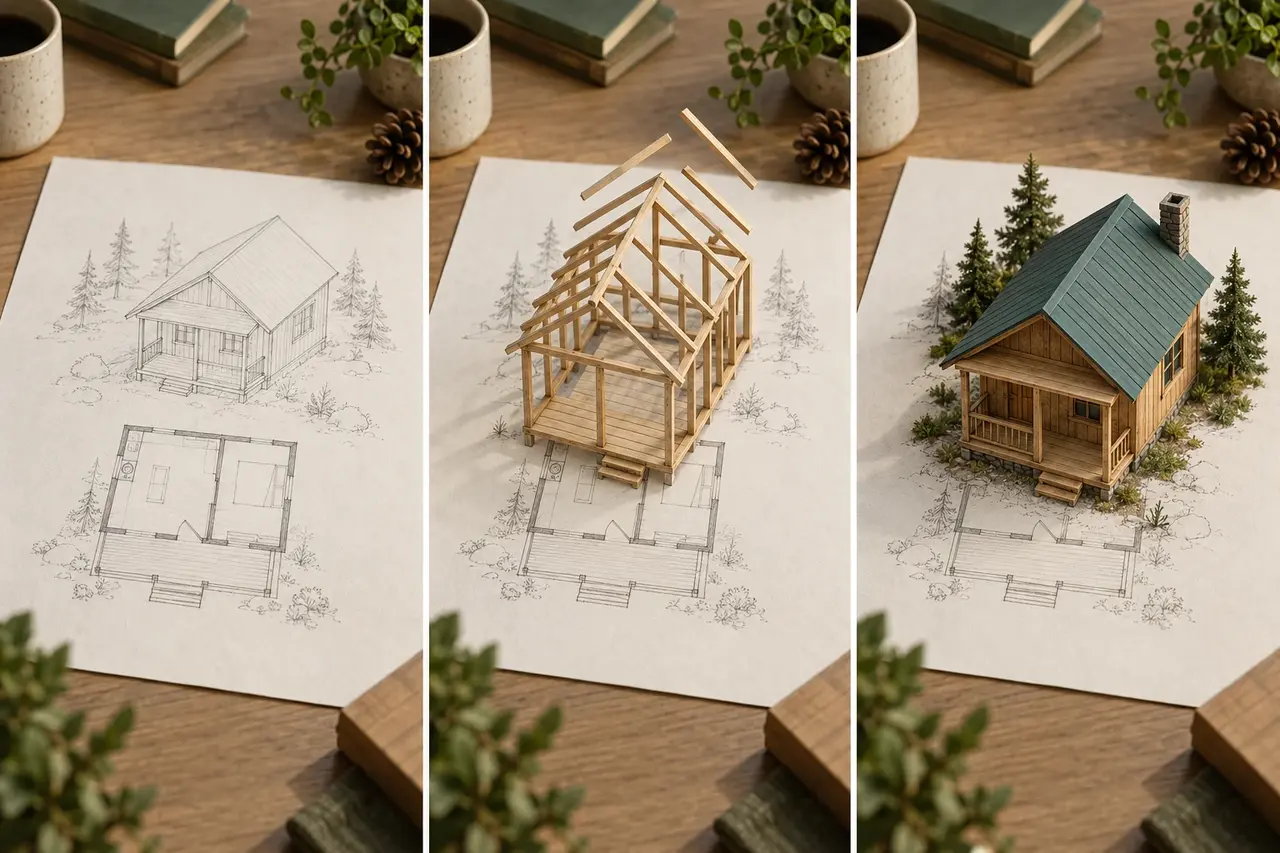
Use the perspective cabin sketch in Image 1 to create a 10-second design concept animation. Fix the camera at a downward angle from the front-right side of the paper. From 0–3 seconds, the sketch lines darken one after another, while the foundation outline stays on the page. From 3–7 seconds, wooden beams rise along the lines and wall panels assemble from bottom to top, with doors and windows staying in place. From 7–10 seconds, the teal pitched roof closes, warm lights appear inside the windows, and a few miniature pine trees appear near the paper's edge. Keep the same sheet of paper and the same orientation of the house. The model always remains within the original footprint. Detailed wood and paper textures, with soft sounds of wooden pieces fitting together. No text.
Unlike the book city, this transformation depends on building the structure in layers. A steady camera lets viewers see how the sketch relates to the finished model.
6. One boot, three kinds of weather: change the setting, keep the subject
Use this for outdoor products, travel gear, and seasonal ads. Keep the product in the same place as the setting moves from sunshine to a rainy night and then snow, changing the mood and showing different contexts of use.
Prepare: A fixed-camera product video trimmed to 10 seconds, with a clear product silhouette. Footage with fewer obstructions makes it easier to maintain consistency.
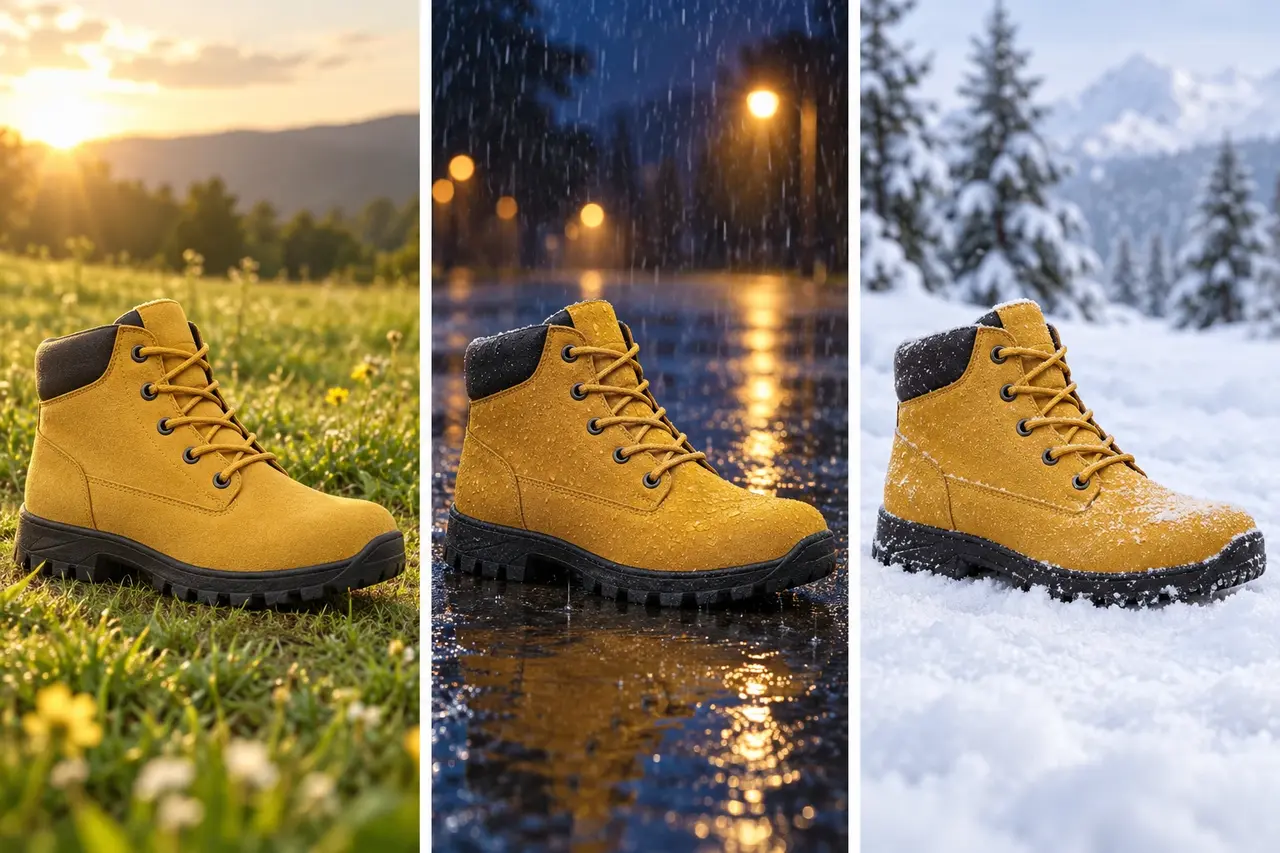
Edit Video 1, preserving its duration and aspect ratio. Keep the yellow ankle boot's shape, laces, position, and orientation unchanged. Fixed camera. From 0–3 seconds, the background is a sunlit lawn with soft grass shadows beside the boot. From 3–7 seconds, gradually transition to wet ground on a rainy night, with a reflection meeting the sole and fine rain falling behind the boot. From 7–10 seconds, a thin layer of snow forms on the ground, and the background becomes a quiet snowfield. Let lighting and contact shadows change naturally with the environment during each transition. Do not let the boot float, rotate, or change style. The sound moves from a gentle breeze to light rain, then returns to quiet wind.
“Change only the background” isn't enough. Shadows, reflections, and ambient light need to follow the setting, or the product will look pasted onto it.
7. A poster character escapes: let a paper cat step onto the desk
Try this for original characters, art posters, or event teasers. The attention-grabbing moment is when the character first lifts its head off the page: the flat edge curls up before the figure gains depth.
Prepare: An original poster with a single main character, clear edges, and a simple background.
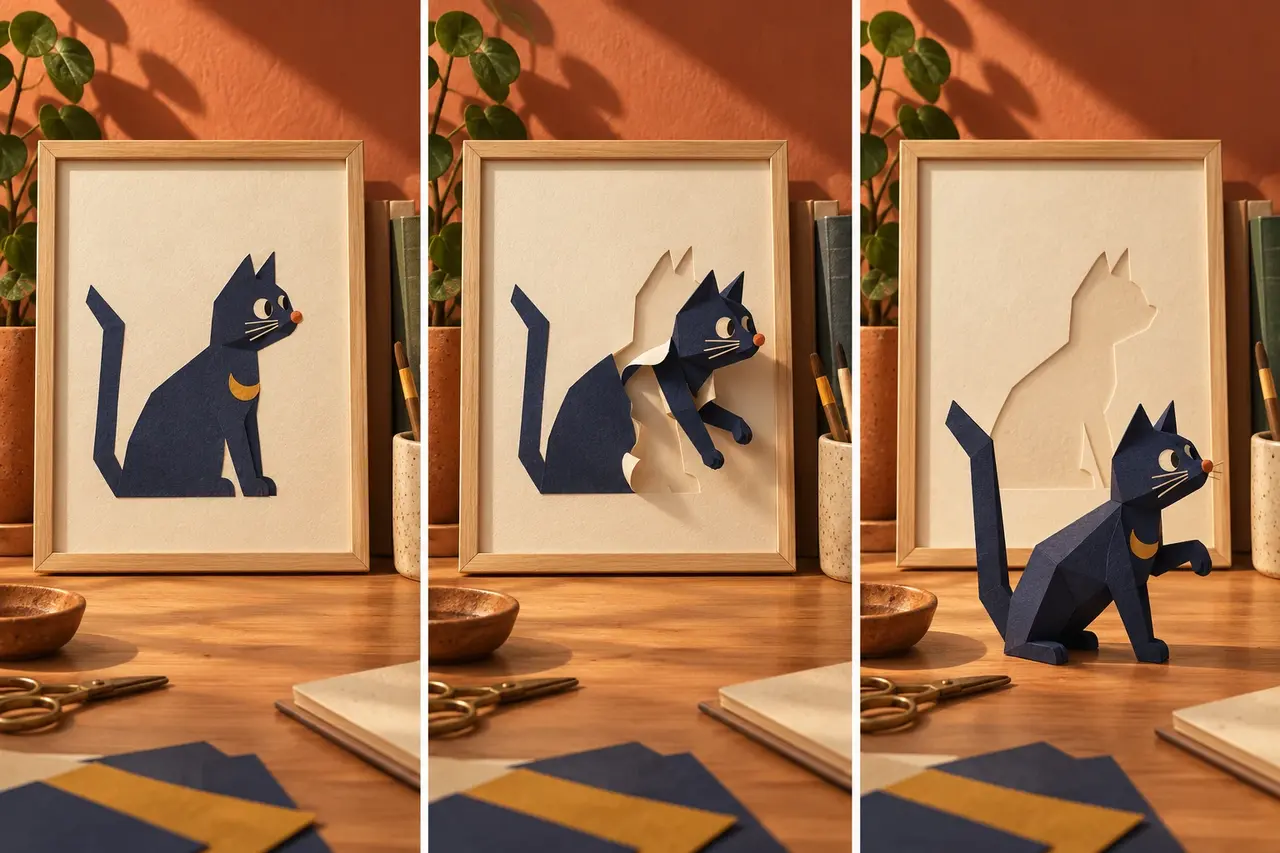
Use the indigo paper cat poster in Image 1 to create a 10-second paper-art film. From 0–3 seconds, the cat stays inside the frame and only turns its head to the right. From 3–7 seconds, its head and front paws slowly lift from the page; paper thickness becomes visible at the edges, and its body folds into a paper sculpture. From 7–10 seconds, it gently jumps onto the desk and raises one front paw, leaving its matching silhouette on the poster. Keep the orange nose, crescent on its chest, and long tail consistent. Make the flat-to-3D transformation continuous, without suddenly switching to a real cat. Fixed camera, warm late-afternoon light, clear contact shadows, soft paper sounds, and a light landing sound. No subtitles.
Start with a simple character. Complex patterns, several characters, and big jumps or runs all increase the demands on consistency at once.
8. Tiny weather in a teacup: make a looping clip
Use this for ambient videos, animated covers, and quiet brand outros. A loop needs its ending to return to the beginning, rather than simply replaying the same clip.
Prepare: A teacup image with space above the rim. In an interface that supports first and last frames, you can use the same image for both.
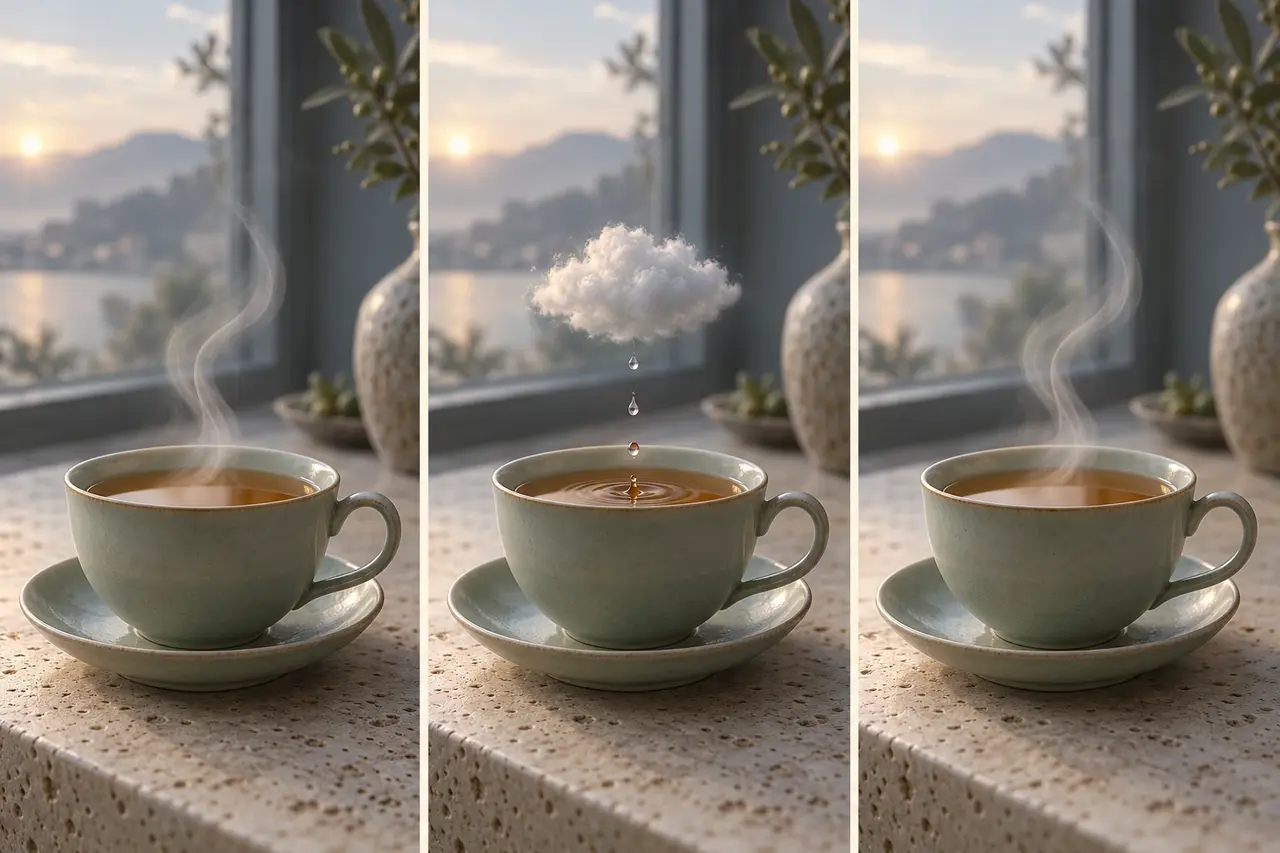
Use the same teacup image as the opening and closing composition to create a 10-second looping concept clip. From 0–3 seconds, a thin wisp of steam curls upward from the cup. From 3–7 seconds, it condenses into a small cloud no wider than the cup's rim; three drops fall, making tiny ripples on the tea. From 7–10 seconds, the cloud gradually disperses back into the original steam shape and the ripples settle. Keep the cup, handle, background, and camera still throughout. Align the ending brightness, tea level, and steam position with the opening as closely as possible. Quiet morning window light, only faint water-drop sounds, and no text.
After generating the clip, join the ending to the beginning and watch for jumps in brightness, shape, and movement speed. Using the same image for both ends helps return to the original composition, but you still need to check how naturally the finished clip connects.
Make the templates your own
Once you choose an idea, change three things first: the subject, the main transformation, and the final frame. Keep a sensible action sequence, then decide whether to add more camera movement or sound. Product images define appearance, character images define the design, and the original video defines the setting. Don't ask every reference to do all the jobs at once.
To turn one of these ideas into a video, go straight to PagePop Short Drama Director. Send the prompt and reference materials, explain which subject details and visual style you want to keep, and work step by step from storyboard to video clips.