Brand visuals with Opus 5.5: extend one logo into posters, cards, and social templates
Turn an existing logo, palette, and copy into consistent brand assets with Opus 5.5 and SVG layouts, including four formats, a sample brief, and delivery checks.

Brand visual work with Opus 5.5 can start from an existing identity, using SVG to arrange text, color blocks, and layouts, then extending them into posters, social images, cards, and patterns. The most useful goal is to maintain a consistent identity across assets while reorganizing information for each reading context.
Prepare your logo, brand name, main colors, typography direction, and accurate copy first. Keeping these as fixed requirements makes a consistent series easier to achieve than simply asking for “the same style” every time.
Fix the identity first, then decide what each asset should say
If you already have a vector logo, provide the original SVG and ask to preserve its paths, proportions, and clear space. If you only have a bitmap, first check whether a clean vector version is available. Do not redraw an approximate logo for every asset. If the logo already includes the brand name, specify whether the name should also appear separately.
Next, choose two or three main colors and one text hierarchy. Headlines need to register from a distance, subtitles explain the content, and details are for close reading. Brand colors can recur without covering every layout entirely in the same color.
The following static layout concepts use the fictional plant studio SLOW LEAF. The same fern identity and purple-and-off-white palette appear in a portrait poster, square post, horizontal card, and pattern.
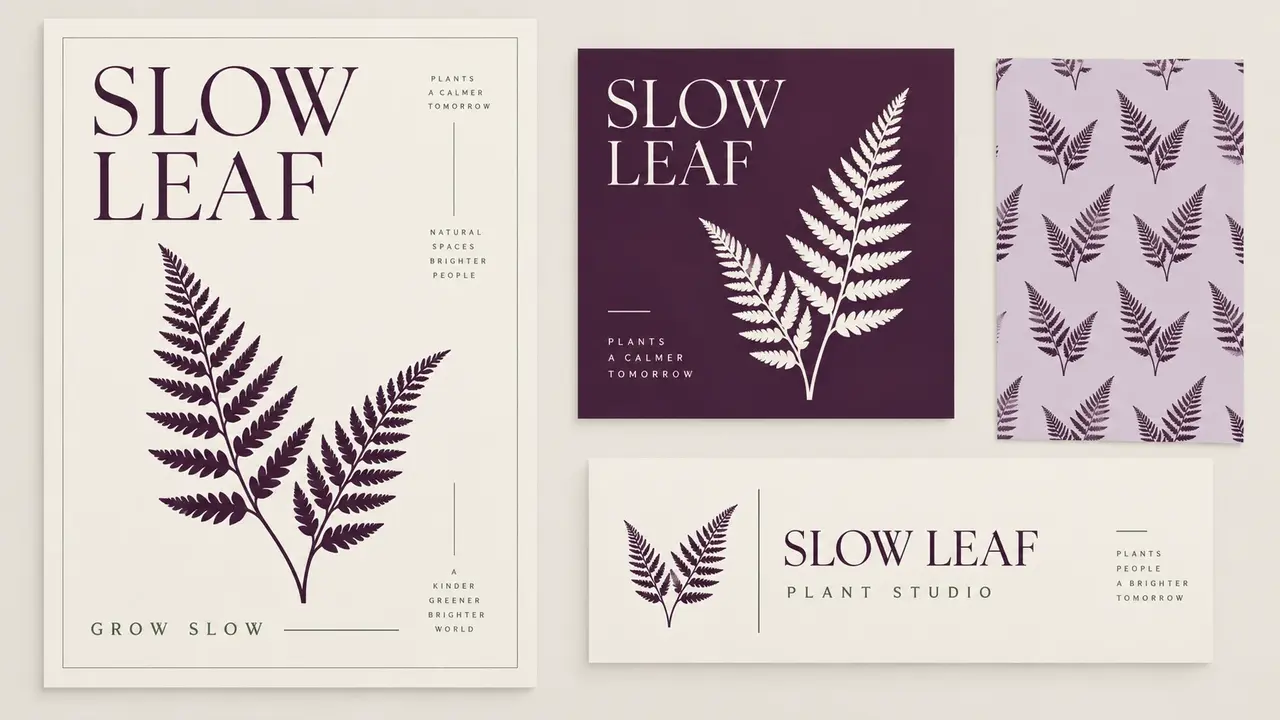
Four asset types, each with its own reading order
Portrait poster. Make the brand or event theme visible first, then provide the time, location, or one main message. The fern can be a large visual focal point. Place detailed information along a consistent edge instead of scattering tiny text everywhere.
Square social template. It still needs to make sense at phone size. Cover one topic at a time, with fixed areas for the headline, image, and identity. Preserve those relationships when changing the content to build a recognizable series.
Horizontal card. Prioritize a clear brand name, purpose, and essential contact information. Use real source material for the copy and leave missing details pending. Thin lines and small text that look attractive in a large preview still need checking at their actual size.
Repeating pattern. Extract a simple shape from the identity for packaging, backgrounds, or dividers. Inspect the base unit, then tile it across rows and columns to check seams, density, and rhythm. The pattern should support the main information without overpowering the text.
Specify what stays fixed and what can change in the prompt
For the first round, ask Opus 5.5 for layout sketches and confirm them before requesting separate files. The dimensions and copy below are a practice brief; replace them with your own materials for actual production:
Using the attached logo, design a set of brand assets for the fictional plant studio SLOW LEAF.
Keep the logo outline, proportions, and brand name unchanged, with a consistent dark purple, pale purple, and off-white palette.
First provide the reading order and thumbnail previews for four layouts. Wait for confirmation before finishing:
1. A 1080×1440 portrait poster with the headline GROW SLOW and space for event information.
2. A 1080×1080 square template with clear headline and image areas.
3. A horizontal introduction card containing only the brand name, PLANT STUDIO, and the provided contact information.
4. A seamless fern pattern without text.
Deliver each as a separate SVG, with text and graphics kept separate, and identify the fonts used.
Provide matching PNG previews and check boundaries, alignment, pattern repeats, and readability when reduced.
Do not redraw the attached logo or invent contact or event details.
When photos or illustrations are needed, create a text-free key visual separately, then place it in the approved layout. Let the image establish the atmosphere and the text carry accurate information. Swapping an image can then preserve the existing headline and logo positions.
Inspect the actual files as well as the previews
SVG allows continued editing of shapes, colors, and text, but it may also contain embedded bitmaps. On delivery, confirm which elements are editable. Change the brand name or headline once to see whether alignment and line breaks hold. Do not rely only on one flattened preview.
Also export images at their intended sizes: inspect the square post on a phone, view the card small, and zoom in on logo edges. Before printing, confirm font, size, bleed, and color requirements. A file that displays correctly on the web still needs preparation to the printer's specifications.
For future assets, retain the same logo, color values, headline rules, and approved layouts. Specify only the new content and aspect ratios.