Nano Banana 2.1 improves panoramas: keeping wide scenes coherent
Use a riverside market to plan the rhythm, depth, and connections across a wide scene. Trace the riverbank and path section by section, with prompts for the overall composition and local revisions.
Google released Nano Banana 2.1 in its October 6, 2026 changelog, announcing improvements to image quality, instruction following, character consistency, and text rendering. Among these, the official model documentation specifically lists a fix for tiling artifacts in high-resolution wide and panoramic images.
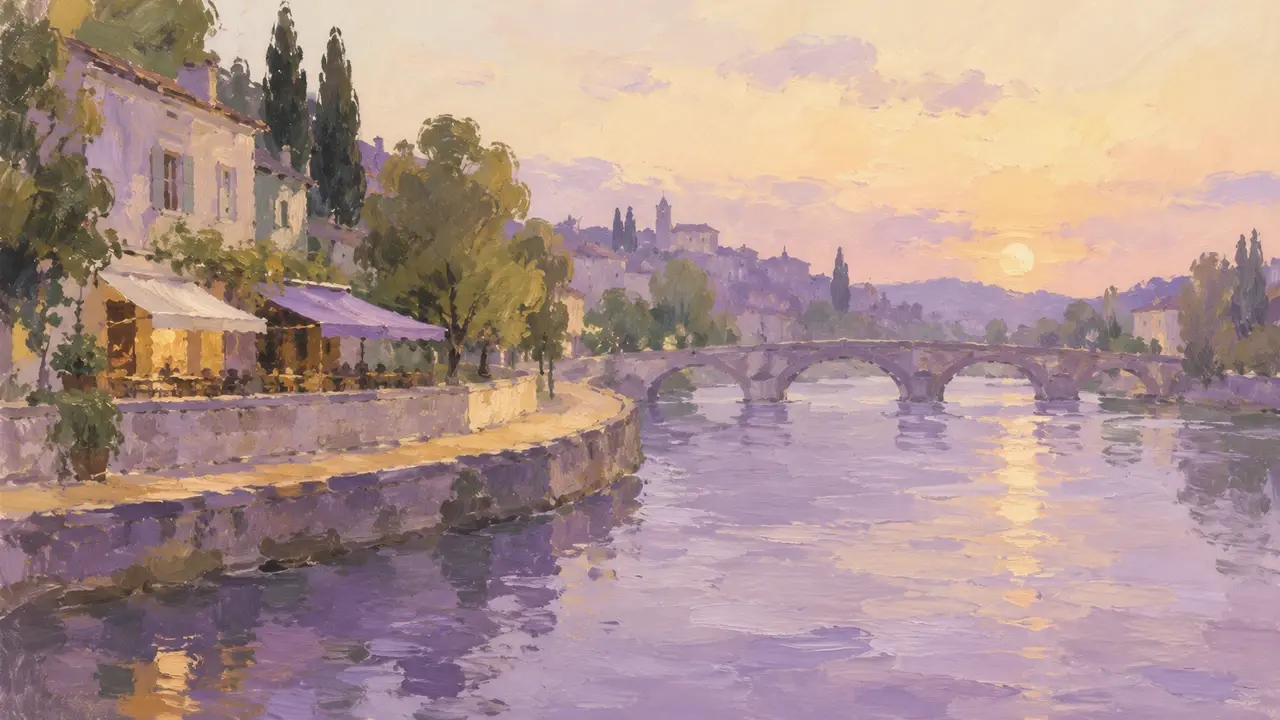
For creators, seams are only one part of making a continuous scene. A wide view of a riverside market also needs a plan for where the activity happens, where the eye can rest, and how the riverbank, buildings, and crowds extend from left to right. The following example uses a fictional evening market to explain the spatial relationships across the image, along with prompts and revision methods.
A panorama needs one space that runs from left to right
Here, a panorama means a stretch of riverside scenery unfolding horizontally. Start by deciding where the viewer stands: on the opposite bank, looking toward the market from a fixed viewpoint. The water is in the foreground, the shops and stalls sit on the path across the river, and low rooftops and a line of trees lie farther back.
This gives the scenery on both sides a shared basis for distance and height. You can see the counters of stalls near the center, while people at the distant bridge entrance appear smaller. The riverbank can shift gradually with perspective, but it shouldn't suddenly rise to the shops' second floor on the right. The same row of rooftops shouldn't switch to a bird's-eye view halfway across the image, either.
The value of a wide composition is that it lets the eye travel through the space. There can be several places worth pausing, while each still feels like part of the same riverbank.
Give the market three rhythms, with meaningful connections
Divide the image loosely into left, center, and right sections. Decide what each section does before adding details.
| Area | Main content | Connection to the next section |
|---|---|---|
| Left | A riverside café with a few seats outside and a quiet atmosphere | The path outside leads toward the central stalls, while the stone railing continues along the river |
| Center | Two distinct market stalls and a few people shopping | The crowd occupies part of the path but leaves a route toward the bridge entrance |
| Right | An open bridge approach and a stone bridge in the distance, with fewer objects | The riverbank and stone railing join naturally at the bridge entrance, while the water retains a continuous direction of flow |
The three sections don't need to be equally busy. A denser center and more open sides give the eye somewhere to pause. Fill every section with shops, strings of lights, and crowds, and a wide image can easily become a repeating strip of decoration.
Pay particular attention to objects that span sections. For example, a path linking the café, stalls, and bridge approach should change width with distance. It shouldn't turn into a plaza in the middle or suddenly disappear on the right. Trees can recur, but their spacing, size, and forms should vary. The same group of chairs and customers shouldn't be copied wholesale into another section.
Plan the distant scenery as a whole, too. Let one continuous line of rooftops and trees run behind the scene, maintaining the continuity of the sky and distant horizon. Then decide where stall canopies obscure it. Hidden sections don't have to be visible, but they should line up when they reappear.
Describe the whole scene in the prompt before listing local details
“Riverside market, café, stone bridge, beautiful lighting” names objects without explaining how they share a space. An initial request could look like this:
Create a wide, horizontal scene of an evening market beside a river. The viewer stands on the opposite bank, looking at the whole market from one fixed viewpoint. The foreground is continuous water, the middle ground is the path and stone railing on the far bank, and the background is one continuous area of low rooftops and trees.

On the left is a small café with two chairs outside. In the center are two stalls with different appearances and a few customers. On the right, leave an open approach to a bridge, with a stone bridge in the distance. The path outside the café passes the stalls and continues toward the bridge approach. The stone railing joins naturally at the bridge entrance. Make the center denser and the sides more open, with connected routes and sight lines between all three sections.

The entire image shares soft evening light from the left. Scale people, trees, and buildings according to distance, keeping the water and distant lines coherent. Avoid duplicating the same group of stalls, customers, or chairs. Don't add text or panel borders.
If you already have a composition sketch, provide it alongside the request and explain which positions need to stay. First check the size and distribution of the café, stalls, and bridge approach. Then add details such as what the stalls sell or the color of the shop walls. The more detail you add, the more important it is to have a stable overall space to hold it.
Inspect each section and look back at the joins
When you receive a first draft, zoom out to see the whole image. Is the center too crowded? Does the bridge approach still feel open? Are all the most noticeable objects clustered in one place? Then zoom in and follow the riverbank from left to right.
Look at neighboring sections together rather than concentrating on one shop or stall. Follow the stone railing behind a canopy, then check where it reappears on the right. Trace the rooftops and tree line to make sure they don't suddenly rise after an obstruction. Compare people on the left and right: those at similar distances should be similar in size. This reveals scenes where each section looks attractive on its own but the sections don't form one space.
Return along another line. Check whether the path runs from the shop door to the bridge approach, whether the crowd blocks it completely, and whether a tree or group of customers appears in two places in nearly the same pose. Repeated objects may not leave a visible seam, but they still undermine the scene's credibility.
When revising, keep the full image as context and mark the area that needs adjustment. In PagePop, you can provide the current image, describe the changes in natural language, and annotate specific areas. Explain the problem, what it should connect to, and what must stay. For example:
Adjust the marked boundary between the central stalls and the bridge approach on the right. The stone railing suddenly rises here. Extend it using the direction and perspective already established by the railing on the left, joining it naturally at the bridge entrance. Keep both stalls, the customers' positions, the open space by the bridge approach, the distant stone bridge, and the evening colors of the whole image.
“Make the right side prettier” doesn't explain the relationship between sections. Point out which line breaks and where it should connect so the revision stays focused on the scene. When you receive the next version, inspect both sides of the marked area as well. Check that the connection has improved without losing the scene's original rhythm.
Fewer seams still leave the whole scene to judge
Google's announced improvements to wide images make tiling artifacts a clear point of attention. Creators still need to decide how the full scene unfolds: can the quiet café, busy central market, and open bridge approach transition naturally along the same riverbank?
To finish, return to the complete image. Can the eye follow the path from the café toward the bridge? Do the distances and layers make sense from the water to the distant rooftops? Clear local details, connected neighboring sections, and a varied overall rhythm give a wide image a continuous space worth exploring.