How to make a hometown photo color card: photos, swatches, and space
Turn a hometown photo and a few matching colors into a keepsake card. Arrange the photo, color strip, and short text while preserving the real scene and the memory behind it.
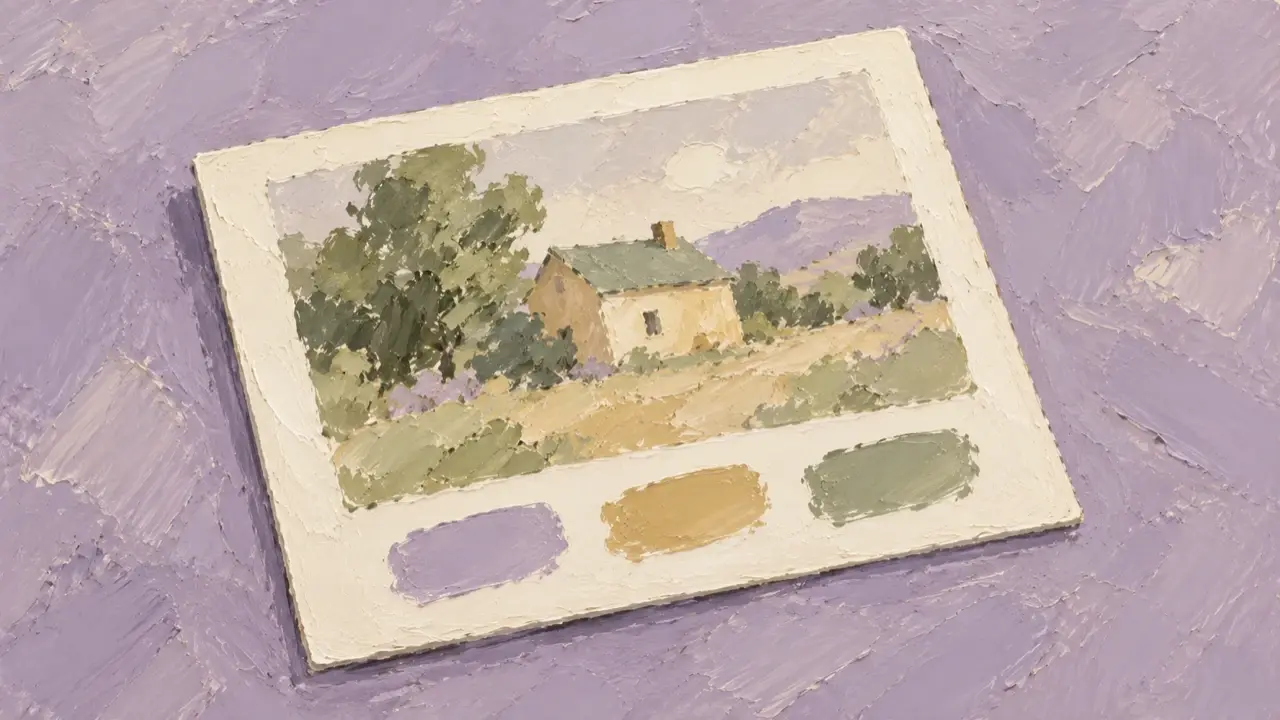
A hometown photo color card pairs one main photo with three to five color swatches that echo the scene, leaving a little space for a place name or the date it was taken. The photo holds the memory; the swatches bring attention to colors you might otherwise overlook.
You can make this keepsake from your own photos of streets, coastlines, hills, or familiar buildings. Start with a photo that has a clear color hierarchy, then arrange the swatches and text. That's an easier way to make something personal than beginning with a complicated template.
Choose a photo with a clear color hierarchy
The photo doesn't need a famous landmark. An old wall, a stretch of riverbank, or a morning market can express a place you know well. What matters is being able to say, “These are the colors and the scene I want to remember.”
Start by choosing three possible photos from your album and look at each one:
- Are there one or two colors covering most of the image, such as a gray-blue sky and a warm yellow wall?
- Is there a small accent that brings it to life, such as a red doorframe or green leaves?
- Is there a distinct subject you want to preserve, rather than just a collection of scattered colors?
If the photo already has a heavy filter, decide whether you want to record the original atmosphere or the filter's colors. To preserve the scene as it was, use the original photo. You don't need to recolor the sky, walls, and plants just to match a particular palette.
Make sure every swatch relates to something in the photo
Three colors are enough to start: one from a large area, one from the main subject, and one from a small accent. If the colors are similar, don't force them into five separate swatches. Fewer repeated colors make a clearer card.
For a riverside street photo, your palette might draw on “gray-blue water, warm yellow walls, and dark green leaves.” Those names describe this particular photo; they don't imply that an entire city has only those colors.
If you want to name the swatches on the card, use short phrases tied to the scene, such as “river blue” or “old wall yellow.” You can also leave them unnamed. Supply the location and date yourself instead of asking the image to guess an address from the buildings.
This is a visual color keepsake, so each swatch doesn't need a color code beneath it. If you already have confirmed color values, you can provide them. Otherwise, the photo and a plain-language description are enough to explain the colors.
Let the photo lead and keep color and text separate
For a first card, choose one of these two layouts.
| Layout | Photos it suits | What to watch for |
|---|---|---|
| Photo above a horizontal color strip | Landscape or square photos with the subject near the center | Don't crop out roofs, people, or the horizon just to make room for the strip |
| A column of swatches beside the photo | Portrait photos with the subject toward one side | Keep the photo wide enough; don't let the swatches squeeze out the main scene |
The photo can take up roughly two-thirds of the layout to begin with. Adjust it to suit the composition: a long bridge, a wide coast, and a narrow street each need different amounts of space.
Use even spacing between swatches. The empty space around them makes their colors easier to compare. Put the place name and date on their own lines rather than over busy roofs, foliage, or crowds. If you only want one title, “The colors of home I remember” is enough; there's no need to add a paragraph of introduction.
Include what must stay unchanged in your request
Provide your photo, then explain which scenery to preserve, which layout to use, and how many swatches you want. Starting with one photo makes it easier to see whether important details have changed during generation.
Here's an example request with location and color descriptions you can replace:
Use my uploaded photo to design a hometown color keepsake card that is easy to view on a phone.
Make the photo the main feature. Preserve the original building outlines, street layout, and main scenery.
Do not add landmarks or recolor the whole photo to match the swatches.

Place the photo above a horizontal color strip, with the photo taking up most of the space.
Arrange three swatches below it, echoing the gray-blue water, warm yellow walls, and dark green leaves in the photo.
Use the photo's visual color relationships as the reference. Do not add color codes or branded color-system labels.
Space the swatches evenly and leave clean, light-colored empty space around them.

Use the title “The colors of home I remember”.
Place: [the location text I have confirmed].
Date: [the confirmed date the photo was taken; remove this line if no date is needed].
Keep the text in the empty space, away from the main scenery.
Do not add location pins, maps, routes, or extra decorations.
Before sending, replace the color descriptions with things you can actually see in your own photo. Remove the location or date requirements if you don't need them. Less text also means less to check letter by letter later.
Check the photo first, then adjust the color strip
Inspect the photo itself in the first draft. Have roofs, street directions, doors, windows, people, or signs changed? If a new building or unfamiliar landmark appears, return to the original photo and clarify what must be preserved before refining the layout.
Next, look at the relationship between the colors. If the strip is too bright, you might say, “Reduce the saturation of the green swatch at the bottom so it feels closer to the leaves in the original. Don't change the photo.” If all three swatches look almost the same, replace one with a more distinct color from a small area of the scene.
If the strip dominates the photo, reduce its height or add more space around it. If the photo is cropped too tightly, restore the complete subject first, then move the swatches. Don't keep shrinking the photo to accommodate decorations.
Finally, check every character in the location and date. If the generated text is incorrect, specify the current wording and its replacement. Don't let AI infer a place name from an unreadable sign.
View the card on your phone
Look at the finished card at your usual photo-viewing size. Is the subject clear? Do the swatches relate to the scene? Can you read the title at a glance? Then compare it side by side with the original and check that the change is in the layout and color presentation, not in the important scenery.
For a series of hometown cards, choose one specific setting per card: a riverside, an old street, a hillside, or a market. Keep the same spacing and text placement while allowing each photo to retain its own colors. There's no need to give the entire set the same filter.