Glimpse understands a 16-second clip: details that make AI video storyboards work
Glimpse’s video understanding demo offers a useful lesson: separate visible actions from inferred motives, then specify characters, props, and timing. A new café story shows how to plan four shots, keyframes, and video prompts.

Writing “make it feel like a story” in an AI video prompt isn’t enough. What a character does first, where a prop is, and when someone else responds determine whether viewers can follow the story.
Elorian’s Glimpse research preview, released on October 16, focuses on visual understanding and reasoning. The official demo uses a 16-second clip of people and luggage to show detailed descriptions, marking 13 key events. For short-film creators, the useful takeaway is to describe exactly what you can see before deciding how the story should unfold.
Describe the action before deciding why it happens
In the demo, you can see a woman packing clothes, a man approaching and raising a hand to gesture, and the woman then leaving with a bag. Reading this as an argument, or even a breakup, is an inference based on their actions and distance. These silent images alone don’t establish their relationship or what happened before.
When taking notes on a reference clip, keep those two kinds of information separate. Under actions, write “puts clothes in the bag, turns around, carries the bag out of frame.” Under motives, you might write “seems unwilling to keep talking,” but don’t let that interpretation replace what actually happens.
You can give characters in your own story clear motives. Then ask: what action will make that visible to the audience? Gratitude can become accepting a forgotten item, looking at the other person, and pausing to smile. Anxiety can become repeatedly checking the door, gripping a handle, and packing faster. That gives your storyboard something the camera can show.
Start a new story by fixing the people, props, and space
Take a café employee returning a forgotten umbrella to a customer. It’s a small incident with a clear setup, omission, discovery, and response, making it a useful exercise in action continuity.
Define three sets of details and carry them through every shot:
- Characters: a short-haired female customer in a dark teal raincoat, and a male employee in a gray top and brown apron.
- Props: one yellow full-length umbrella with a curved handle, and a burgundy notebook. There is only one umbrella throughout.
- Setting: the same warmly lit café, with a green glass-paneled door on the right side of the frame and rain outside.
Don’t introduce a new “good-looking customer” in every shot. Repeating the clothing, hairstyle, and key props helps viewers recognize one continuous event even when the camera angle changes.
Four shots, each moving the story forward by one step
This four-panel storyboard illustrates the new story. Read it from top left to top right, then bottom left to bottom right.
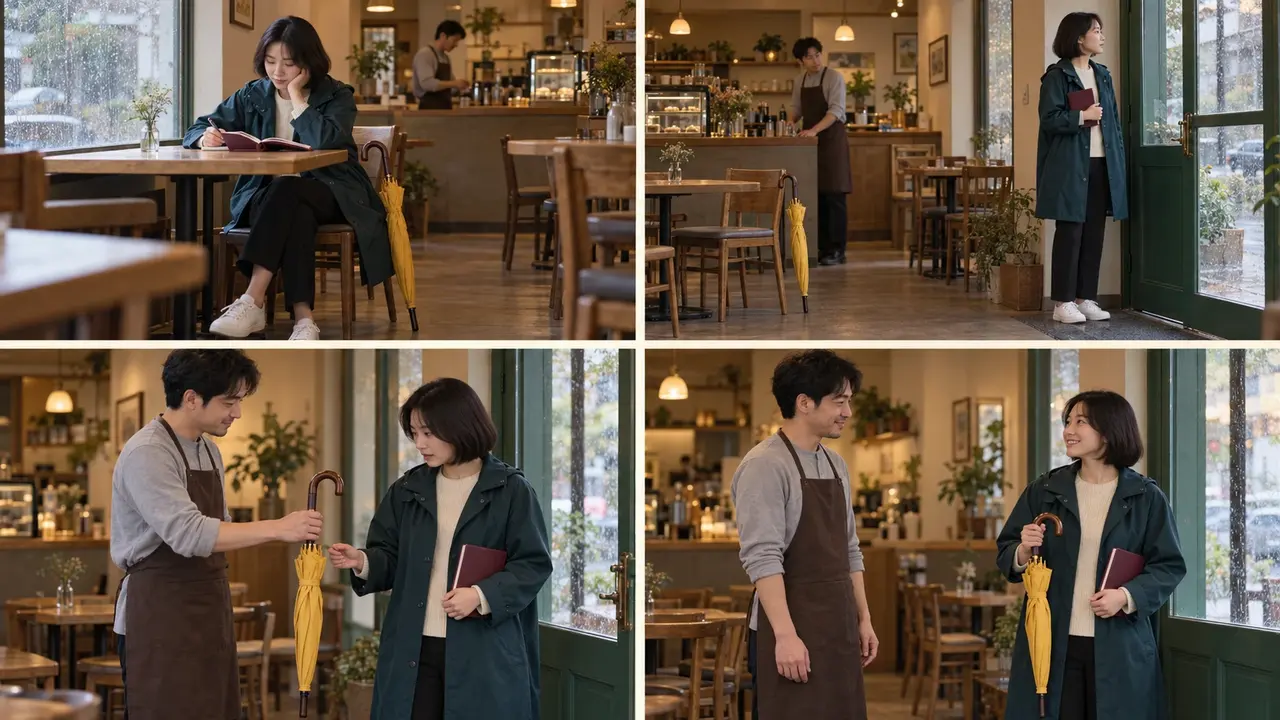
- Establish ownership. The customer writes in her notebook by the window, with the yellow umbrella resting beside her chair. First show viewers whose umbrella it is.
- Show what was forgotten. The customer reaches the door holding her notebook. The umbrella remains beside the empty chair, and the employee notices it.
- Move the action forward. The employee holds the umbrella out to the customer. She turns back and looks at it.
- Complete the response. The customer now has the umbrella. She looks at the employee and smiles, ending the story on that response.
For the handoff to matter in shot three, shot two must first show that she forgot the umbrella. Without that setup, viewers may only see two people exchanging an object.
Turn the action breakdown into a PagePop creative brief
Once you have the story and the details that must stay consistent, organize the storyboard images and keyframes in PagePop. Clarify all four panels first, check character and prop continuity, and then choose an individual shot to develop into video. This makes problems easier to identify than cramming the whole plot into a single request.
Create a four-panel realistic cinematic storyboard for “Returning an umbrella at a café,” in this order: writing in a notebook, forgetting the umbrella, the employee returning it, and the customer accepting it with a smile.
Use the same short-haired female customer in a dark teal raincoat and the same male employee in a gray top and brown apron in all four panels.
Keep the same yellow full-length umbrella with a curved handle and the same burgundy notebook. In shots one and two, the umbrella rests beside the chair; in shot three, the employee holds it; in shot four, the customer holds it.
Use the same warmly lit café, with a green glass-paneled door on the right and rain outside. Each panel should show one clear action state. Add no dialogue, subtitles, or extra characters.
When developing the video brief for shot three, add the order and pacing of the movements:
Keep the characters, clothing, yellow umbrella, and café from shot three. Use a fixed medium shot. The employee gently offers the closed umbrella to the customer, then holds still.
The customer first looks down at the umbrella, then raises her eyes toward the employee. Her expression shifts from surprise to ease. Keep the movements natural and restrained, with no cuts and no second umbrella.
Review the result by following that action chain. Are the people still recognizable? Does the umbrella suddenly change color or appear in two places at once? Does the customer look at the object before responding to the person? If an action link is missing, add it. More style adjectives won’t fill a gap in the story.